
To be able to use Instagram Messaging, the only criterion is to have your account as a business account. If your page is not yet professional, the first thing you need to do is convert your account to a business account.
Luckily, we have a pretty comprehensive guide on this process in case you run into this problem.
If your Instagram account is currently a Business account, you can follow these steps with peace of mind 👣
Steps to Allow Access to Messages on Instagram
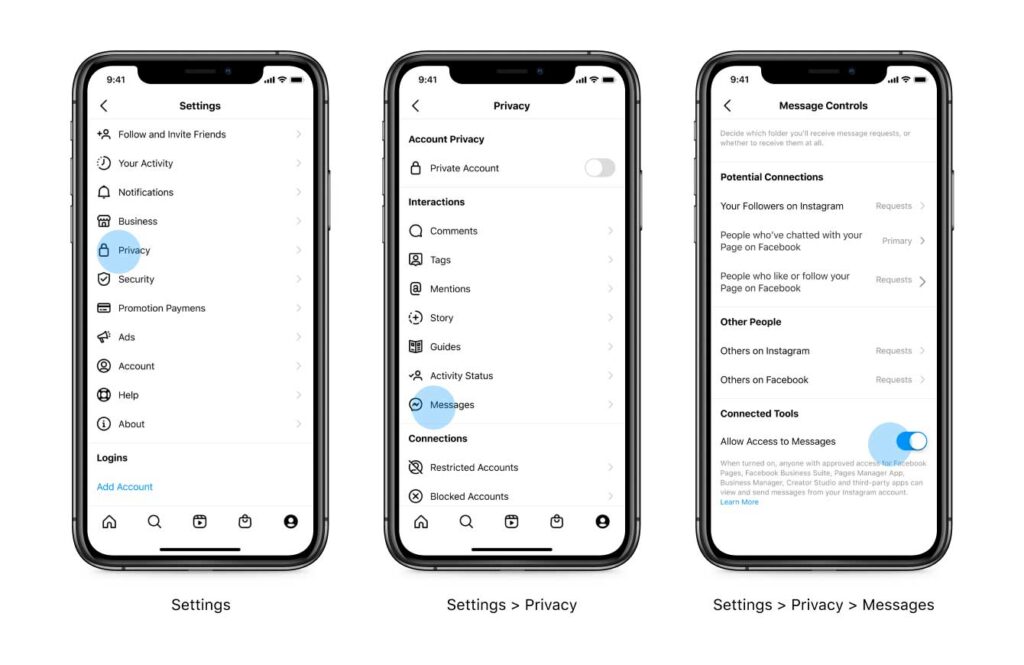
You need to enable the connected features to move to the message management settings on the Instagram profile, as shown in the image below.
After that, the access token of the linked pages on your Dailyfy account needs to be updated, just to save the changes from the first step.
You can check out our other guide to see how to update tokens.
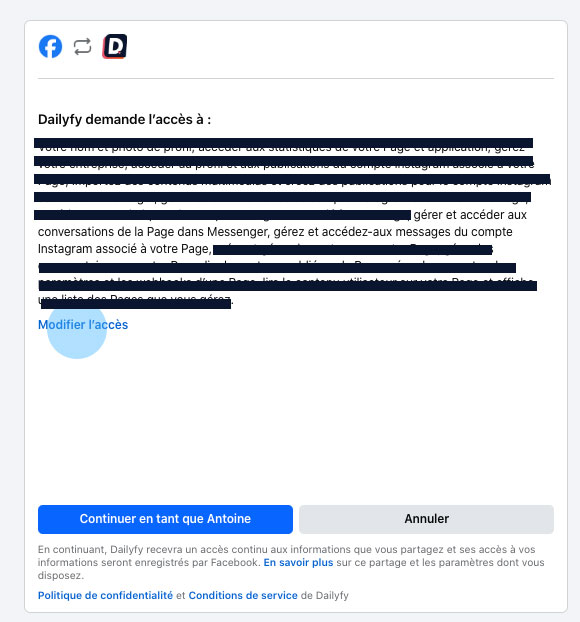
You’ll be redirected to Facebook to renew your permissions after step 2. Make sure to grant the option “Manage and access messages from the Instagram account associated with your page”.
If you don’t see this permission:
- You can click Change Access to make sure this permission isn’t unchecked.
- Make sure your Instagram account is linked to your Facebook page.
- Make sure you have an Instagram business account.
Quick note : If you don’t access this permission at this step, the sync won’t happen and the system won’t ask you for this permission anymore.
However, you can always update this permission from here.
Remember that you need to update the tokens of all pages connected to Dailyfy after this process
It’s done! You are now ready to manage the messages and comments of your Instagram accounts. Feel free to let us know your questions or suggestions via the chat. We will be delighted to hear from you