
Dailyfy lets you mention a page/person on your publications.
There are two ways to mention Dailyfy:
- Using the single mention, you add an @ and then the name of the page/person to be mentioned. A list of results appears with suggestions.
- By using the universal mention (very useful if you have active synchronization or if you regularly mention the same people). Just click on the @ in the toolbar. Find out more about universal mentions.
The limits of mentions
- This mention feature is only available for Facebook, Instagram, LinkedIn and Twitter (X) at the moment.
- For Facebook & Linkedin, you can only mention pages or profiles you’ve already mentioned.
- For Twitter (X) and Instagram, you can mention any account, including people.
Mention a page on Facebook
Unfortunately, due to Facebook API restrictions, we are unable to tag personal Facebook profiles.
You can mention a page by typing @pagename” (just like on Facebook), our system will search all the pages and find the specific mention.
Then select one of the suggestions/results returned by the Facebook API.
If you can’t find the Facebook page, please check that it’s not a personal profile and that the page has been published.
You can find the page name on their Facebook page. It’s displayed in the page name and URL.
Mention on Instagram
Due to Instagram limitations, Dailyfy cannot auto-complete or spell-check usernames for personal accounts, only for business accounts. You should double-check the spelling of usernames for personal accounts before saving.
You can mention a page by typing @pagename” (just like on Instagram), our system will search for professional accounts and find the specific mention.
Due to an API limitation, we are unable to search and display personal Instagram accounts.
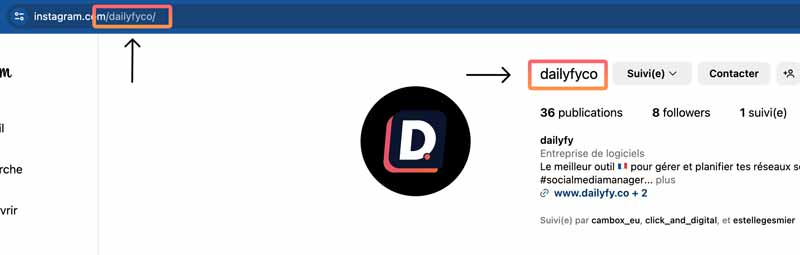
However, you can always enter the Instagram handle manually and correctly, and the account will be mentioned accordingly once the publication is published.
For more information: https: //www.help.dailyfy.co/categories/planification-publication/fonctionnalites-publication/comment-mentionner-un-profil-instagram-11517/
Since on Instagram, the "@" is kept in front of the name when it's tagged, even though the account you're looking for may not appear as suggested if it's the correct handle, it will be tagged once published.
Mention a page or a person on Linkedin
On Linkedin, you can only mention Linkedin pages or people you've already mentioned in the past in your posts.
It’s exactly the same procedure as for other accounts.
You need to select a Linkedin account from our profile bar.
Then simply type @companypagename and it will appear in a list below.
Then select one of the suggestions/results returned by the Linkedin API (important)
We can tag people you’ve already mentioned in past posts.
Mention/tag on X (Twitter) - Available soon
It’s exactly the same procedure for Twitter.
Select a Twitter account from our profile bar.
Then just type @nomducompex and it will appear in a list below.
Then select one of the suggestions/results returned.
Mention when you post on different social networks.
Due to API limitations, you can't mention multiple accounts from different social networks with a single click. Each social network has its own unique infrastructure for managing mentions.
When you activate the “synchronization” feature – that is, you want to publish similar content on several social networks at the same time – you won’t be able to mention it, as each platform has its own infrastructure.
If you enter an @, you’ll get an alert, inviting you to use the “universal mention” feature.
To overcome this limitation, we have developed a “universal mention” feature.
To use it, simply click on the @ icon in the toolbar.
You can then search for your page using the search bar. Our system will search through the various APIs to find the best result.
You can check that it’s the page you want to tag by clicking on the page name or checking the profile photo.
If you find an error, just click on the trashcan on the right, and you’ll be able to perform a specific search for a specific network.
Using the identifier of this mention group, the system will automatically adjust the identifier for each platform.
To find out more, visit .