Why hasn’t my cover photo been added to my YouTube videos?
ÉQ
Équipe Dailyfy
1 min read0 views
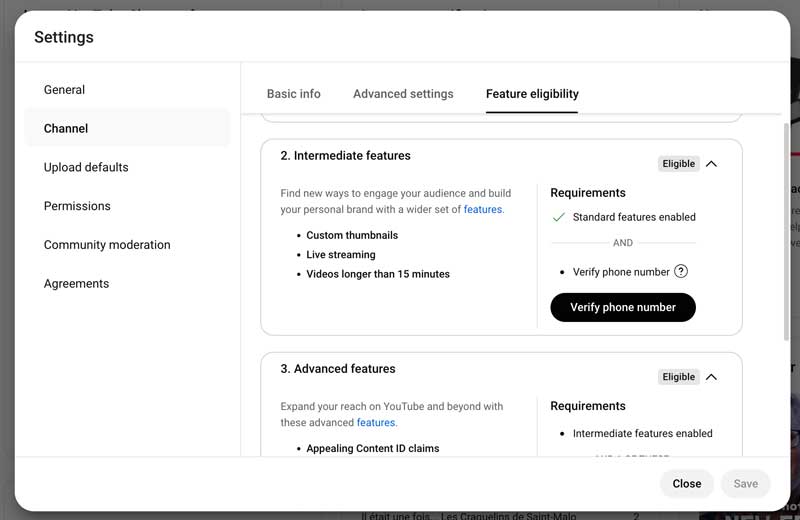
If you added a cover photo to your YouTube video but it didn’t appear on your video on the YouTube platform, this probably means that your YouTube account is not eligible for this feature. Don’t panic! Here are the steps to customize a cover photo for your YouTube video.
Steps to become eligible for YouTube thumbnail customization
Just log in to your Google account and go to YouTube.
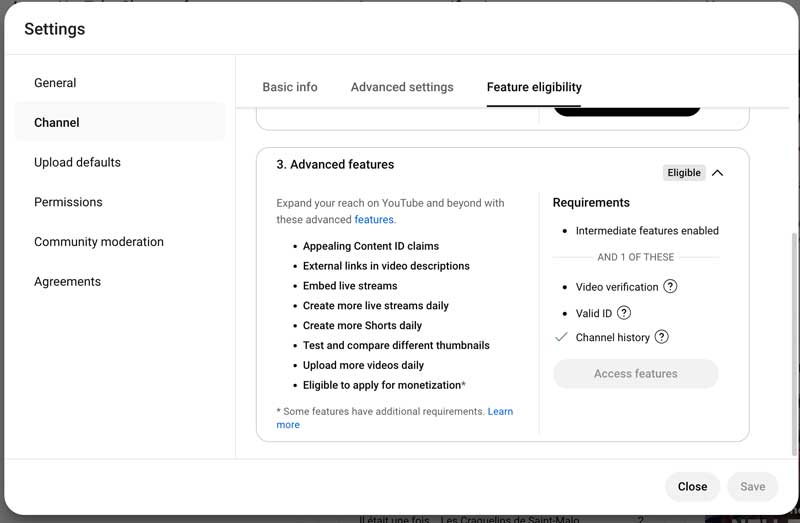
Verify that all three features are accepted by YouTube.
If you ever see an “Eligible” tab, it means that you do not have this feature but can request it.
YouTube clearly states the eligibility requirements. In most cases, you will just need to verify your account with a phone number or official documents.
Was this article helpful?
Support Dailyfy
Still need help?
Our team is here when the documentation does not answer your question.