

How do I tag products on an Instagram post?
With Dailyfy, you can tag one or more products from your Meta store on a post.
Why tag products on an Instagram post?
Product tagging on Instagram offers increased visibility and simplifies the shopping experience for customers. This feature enables brands to provide detailed product information, increasing traffic to their website and potentially sales. It also gives access to valuable insights into user engagement. Finally, multiple tagging and improved conversion rates make Instagram an effective digital shop window for businesses.
What are the conditions for identifying products on an Instagram publication?
In order to use this feature, you must respect these conditions/limits:
- You must have a business account only (Creator accounts are not supported).
- You may not exceed 25 publications with identified products within 24 hours. Carousels represent a single publication.
- You must have a verified and verified and published.
- You must have products in your store.
The account synchronized with Dailyfy must have the Admin role in the Business Manager.
What content is compatible with product identification?
You can identify products on the following media:
- Classic image (maximum 20 tags)
- Carousel (up to 5 tags per slide, with a maximum of 20)
- Reel (20 tags maximum)
You can’t identify products on :
- Stories
- Direct
What are the steps for identifying products on an Instagram post?
To tag products from your Meta store on Instagram, simply follow these steps:
- 1. Access the planner
- 2. Select your Instagram account in the profile dock
- 3. Add compatible media (image, carousel and reel)
- 4. When you hover your mouse over the media, you should see the TAG button.

- 5. A new window should appear. On the left you’ll find your media, and on the right you can select your product(s).
- 6. Click on the image where you want your product to appear.
- 7. Search for the product to be identified on the right and select it.
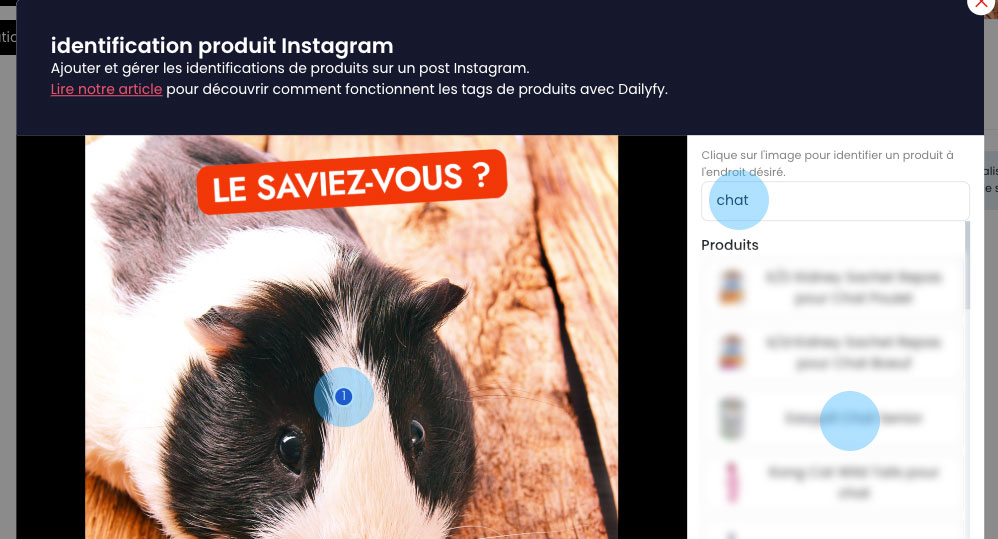
If you have other products to identify, simply repeat the same operation.
Then you can close this window.
It’s as simple as that.


